Host a server on Render
One person in the group runs the signaling server and shares its address. Everyone else pastes that address into the extension's setup page once. The server carries display names, the room code, which episode the room is on, and the play/pause position — never any video or audio.
This page sets one up on Render, which runs it for free at an address that never changes. It takes about five minutes and needs no credit card. You do not need a copy of the source code. Render is a separate company, unconnected to this project — see about Render before you commit to it.
There are two other ways, if this one does not suit you:
- Host from your own machine — a tunnel from your laptop for one evening.
- Host on your local network — everyone on the same Wi-Fi, nothing exposed to the internet.
1. Create the service
Sign in at dashboard.render.com, then choose New → Web Service. On the source step, pick the Existing Image tab and paste this into Image URL:
ghcr.io/thatjoaoguy/gather-and-join-server:latest
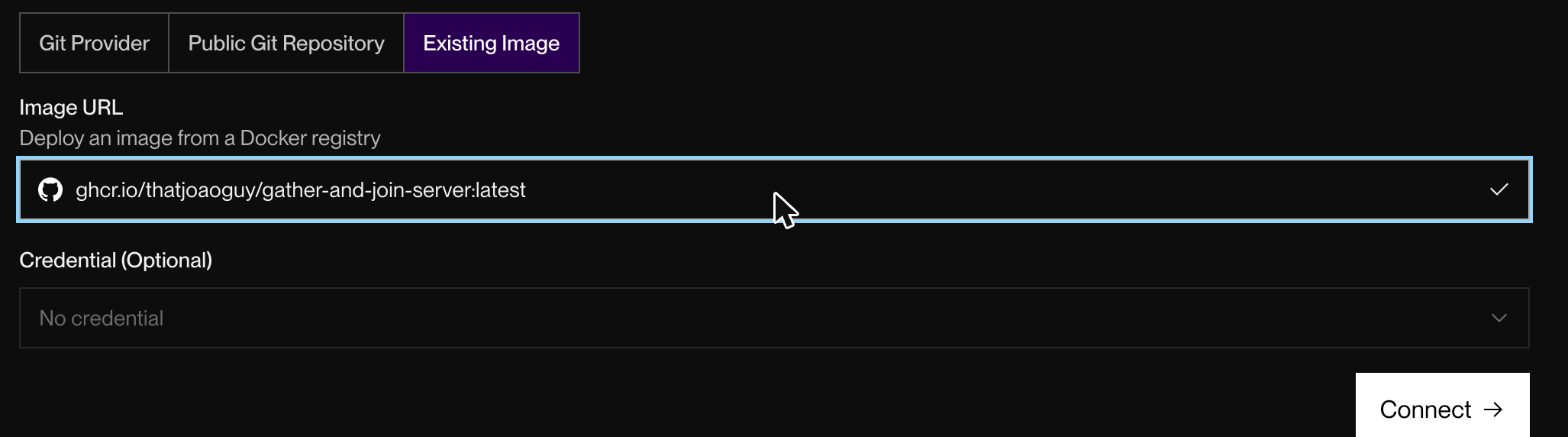
Leave Credential as "No credential" — the image is public. Press Connect.
2. Choose the free plan
Give the service a name. The name becomes its web address, so pick something
only your group would guess — movie-night-8f21 rather than gather-and-join.
Anyone who finds the address can create rooms on your server.
Pick a region close to the people watching. The server is the room's clock, so distance to it costs everyone a little accuracy.
Then scroll to Compute — and read this part carefully:
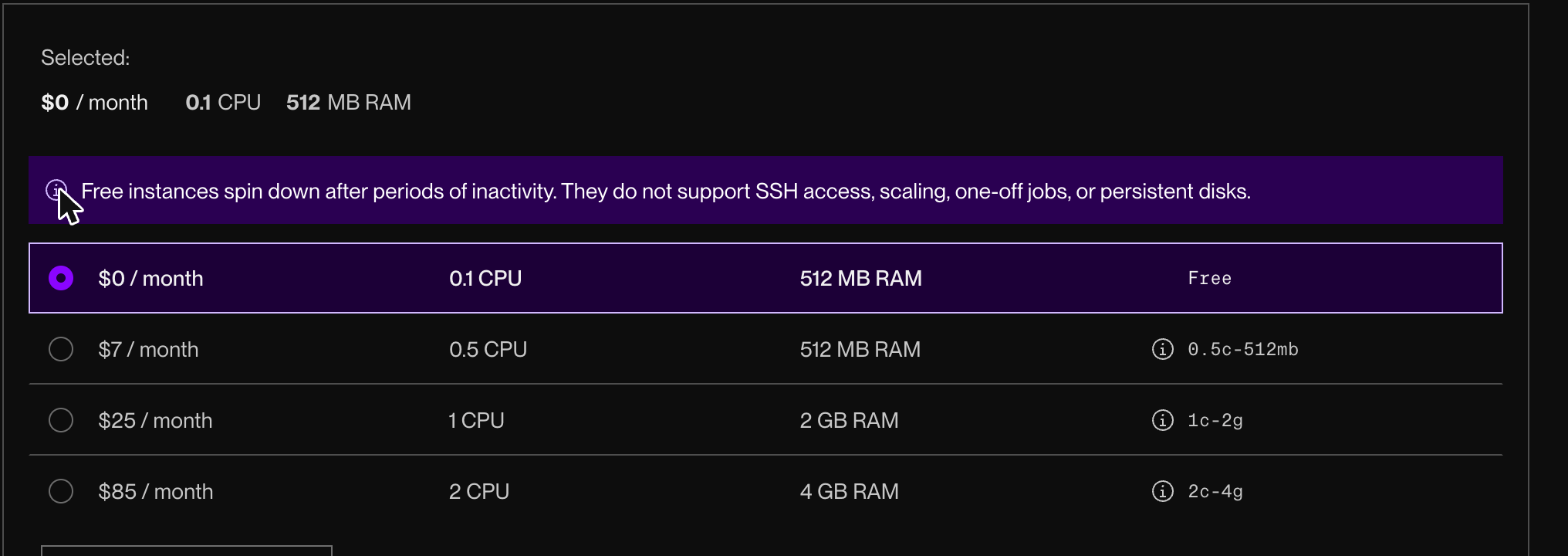
Render pre-selects the $7/month plan. Free is the first row but is not chosen for you. Click it, and check the bar at the bottom of the page reads $0 / month before you go on.
The warning Render shows about free instances sleeping is real, and harmless here — see what sleeping means below.
Now press Deploy web service. The first deploy takes a minute or two.
You can ignore everything under Advanced. Render watches the port the server listens on, which for a single program with no database is the same thing as watching the server.
3. Check it works
Render gives the service an address like https://movie-night-8f21.onrender.com.
Open it in a browser. A server that is running says so in plain words:

Add /health to the address for the same answer with detail — the version, how
long it has been up, and how many rooms and people are on it right now:
{"status":"ok","version":"0.3.1","uptimeSec":412,"rooms":1,"peers":3}
Those two are the only things served over the normal web. The extension itself
connects with wss://, which is why the address you share is not the https://
one.
4. Share the address
Take the address Render gave you, swap https:// for wss://, and send that to
everyone:
wss://movie-night-8f21.onrender.com
Each person pastes it once on the extension's setup page, and never again — it does not change between parties. See Install for their side.
What sleeping means
A free service goes to sleep after 15 minutes with no traffic, and wakes up when someone connects. In practice:
- It cannot fall asleep during a party. Every connected extension checks the clock once a minute, which counts as traffic.
- The first person to arrive waits about 12 seconds while it wakes. They see a Render holding page rather than the server, which is normal:

- If you would rather nobody waits, open the
/healthaddress yourself a minute before the party starts.
Sleeping is also what keeps it free: a free workspace gets 750 hours of running time a month, and the clock only ticks while the service is awake.
Updating the server
Render does not pick up new versions on its own for this kind of service. When a
new release comes out, open the service in the dashboard and choose Manual
Deploy → Deploy latest reference. Check the version afterwards at /health.
Other places it can run
Nothing here is specific to Render. The server is a small Node program with no database and nothing stored on disk, published both as a container image and as a single file, so it runs anywhere that can run Docker or Node 22.6 or newer — a spare machine, a home server, another hosting provider.
Three things matter wherever you put it:
| Setting | Value |
|---|---|
| Port | 8080, or set PORT to match what the host expects |
| Health check path | /health, if that host insists on one |
| Number of copies | exactly one |
The last one matters more than it looks. The server keeps rooms in its own memory, so two copies means two separate parties: people who type the same room code land on different ones and never see each other. Nothing reports this — it simply looks as though your friends never arrived. Turn off anything that adds copies automatically.
About Render
Render is an unaffiliated third-party company. Gather & Join is not associated with, endorsed by, or sponsored by them; they are suggested here because their free tier happens to suit this server, and nothing is received for saying so. Their prices, free-tier limits and terms are theirs to change, and the screenshots above show their product as it looked when this page was written — expect it to drift.
Choosing any hosting provider has one consequence worth weighing. The encrypted connection from each participant ends at their infrastructure rather than at a machine you control, so the room's display names and room code pass through it, and the server's event log sits in their dashboard. That is not specific to Render; it is true of hosting anything anywhere.
If you would rather nothing outside your group carried it, run the server on your own machine, or on your local network where it never leaves the house.
Privacy notes for hosts
The server prints one line per room event (created, joined, left) to its log,
with display names — on Render, under the Logs tab. It writes nothing to
disk. Set a GJ_LOG environment variable to 0 to silence the log. See the
privacy policy for the full picture.